

How It Works
Jam Assistant recognises you by your caller ID. When you call from a registered number, Jam Assistant loads your CRM connections, Playbook rules, and Memory entries - and you’re immediately in a full-capability session, just like a browser voice call.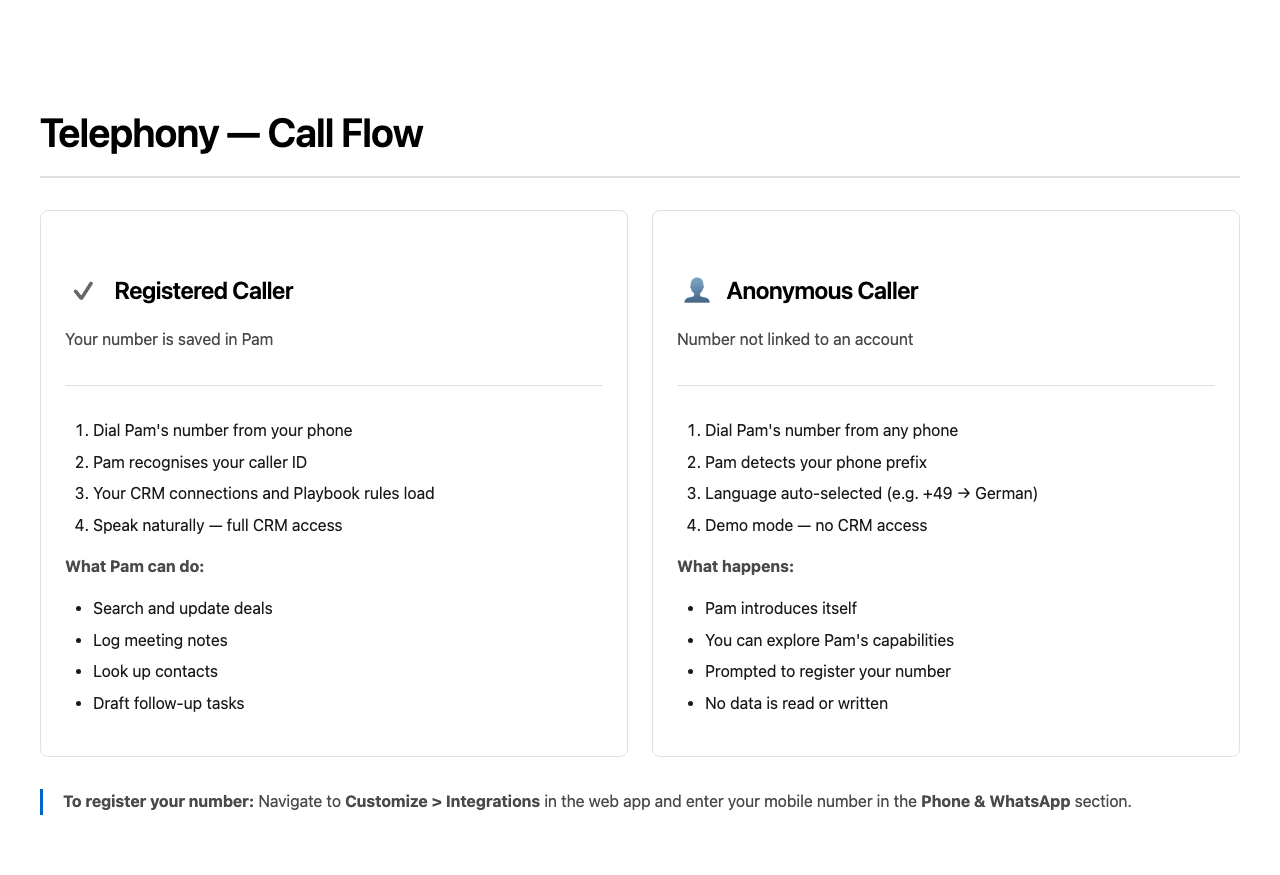
Registered Caller (full access)
- Dial Jam Assistant’s number from your registered mobile
- Jam Assistant matches your caller ID to your account
- Your CRM, Playbook, and Memory load automatically
- Speak naturally - Jam Assistant can search, update, and create CRM records
Anonymous Caller (demo mode)
If you call from a number that isn’t linked to a Jam Assistant account:- Jam Assistant detects your phone prefix and selects a language automatically (e.g.
+49→ German,+33→ French,+34→ Spanish, English by default) - Jam Assistant introduces itself and offers a demo experience
- CRM tools are not available - no data is read or written
- You’ll be guided to register your number for full access
Finding Jam Assistant’s Phone Number
Navigate to Customize > Integrations in the web app. At the top of the page, in the Jam Assistant is everywhere you are section, you’ll find:- A tap-to-call link with Jam Assistant’s phone number
- A QR code to save Jam Assistant as a contact on your phone (scan once, call anytime)
- A WhatsApp button to open a chat session
Registering Your Number
To get full CRM access on phone calls, your mobile number must be registered in Jam Assistant.- Navigate to Customize > Integrations
- Enter your number in the Add your number to reach Jam Assistant via Phone field
- Use international format - e.g.
+49 170 1234567or+1 415 555 0100 - Click Save
When to Use Telephony vs Other Channels
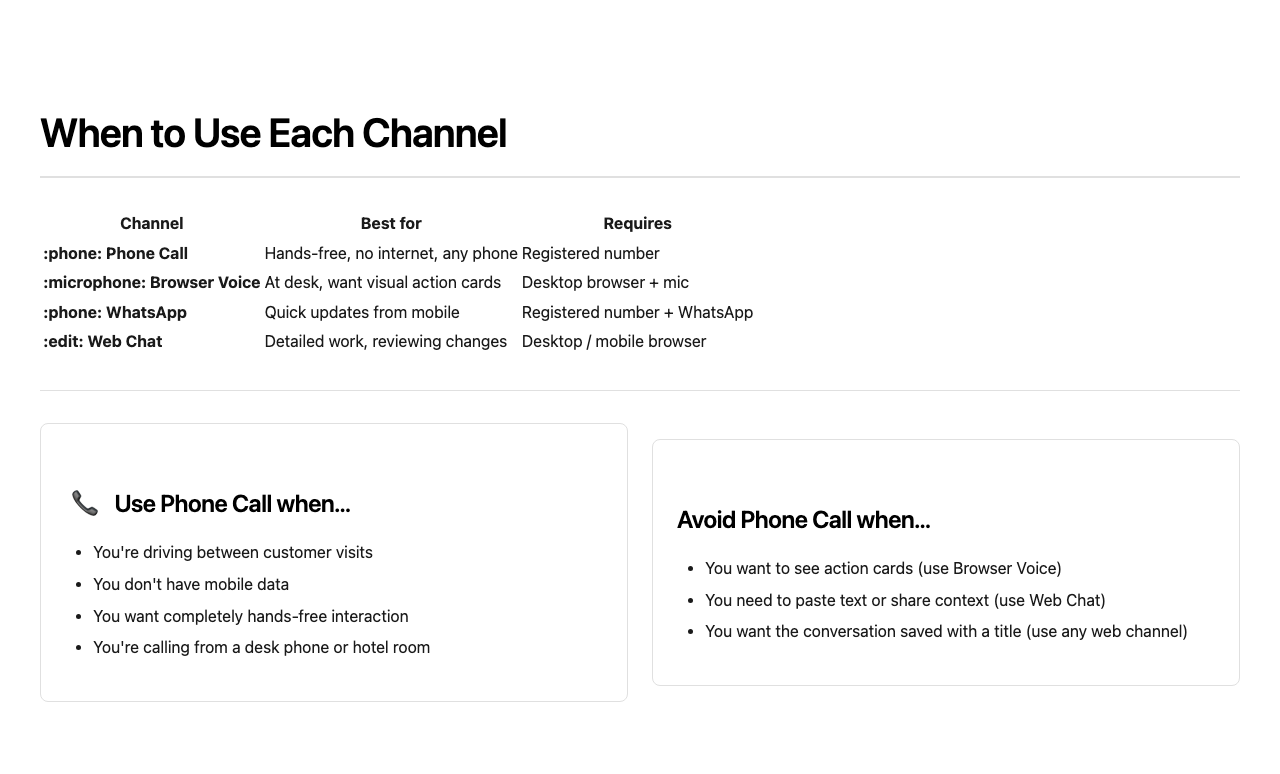
Choose Phone Call when:
- You’re driving and can’t touch your phone
- You’re in an area with no mobile data (calls use cellular voice, not data)
- You’re calling from a desk phone, hotel phone, or shared device
- You want a completely audio-only, distraction-free experience
- You’re at your desk and want to see action cards confirming CRM changes
- You want a call summary automatically generated after the session
During a Call
A telephony call works exactly like a browser voice call:- Speak naturally - Jam Assistant listens and responds in real time
- Jam Assistant performs CRM actions while you talk (search, update, create)
- You can interrupt Jam Assistant mid-sentence
- Say “goodbye” or hang up to end the session
Tips
- Save Jam Assistant’s number as a contact - scan the QR code on the Integrations page once and you’ll have it permanently.
- Debrief while driving - “Jam Assistant, I just left Acme Corp. Move the deal to negotiation and log a note that they’re asking for a 10% discount.” Done before you reach the motorway.
- Prepare for a meeting - “What’s the latest on TechStart? Who are the key contacts and what’s the deal stage?”
- Use your Playbook slash commands - say “slash debrief” or “slash prep TechStart” to trigger your personal commands by voice.
Troubleshooting
Jam Assistant doesn’t recognise me / gives a demo experience Your number isn’t registered. Navigate to Customize > Integrations on the web, enter your mobile number in the Phone field, and save. Then call again. Call dropped or no response Telephony uses standard cellular voice. If the call drops, redial. Jam Assistant will resume with context from earlier in the same session if you call back within a few minutes. Jam Assistant responded in the wrong language Jam Assistant auto-detects language from your phone prefix for anonymous callers. For registered callers, language follows your Playbook settings. To change it, update your personal instructions in Customize > Playbook > My Settings. CRM actions aren’t showing in Chat History Phone sessions appear in the Actions page after the call ends - refresh the list if the session isn’t visible yet.Related Documentation
- Integrations - Register your phone number
- Voice Calls - Browser-based voice with visual action cards
- WhatsApp - Text and voice messages via WhatsApp
- Playbook - Define slash commands that work on phone calls
- Chat History - Review past phone sessions and CRM actions