> ## Documentation Index
> Fetch the complete documentation index at: https://docs.wejam.ai/llms.txt
> Use this file to discover all available pages before exploring further.
# Using the Jam API for Data Export
> Create an API key and pull your training data from JAM's data-export endpoint for custom reporting in your BI tool, LMS, or other systems.
The Jam API lets you pull all training-related data from JAM so you can use it for custom reporting in your business intelligence (BI) tool, LMS, or other systems.
For LMS integration, you can also use the **xAPI** standard as an alternative.
For the full endpoint schema, see the [API
reference](/api-reference/data-export/export-paginated-users-data). Prefer a
no-code path? See [Export training data to
Excel](/external/coach/help-and-reference/export-to-excel).
## Create an API key for your organization
The first step is to create an API key for your organization. To do this, you need to be an **Owner** of your organization in JAM.
As an Owner, create an API key here:
> 🔑 [https://auth.wejam.ai/org/api\_keys/](https://auth.wejam.ai/org/api_keys/)
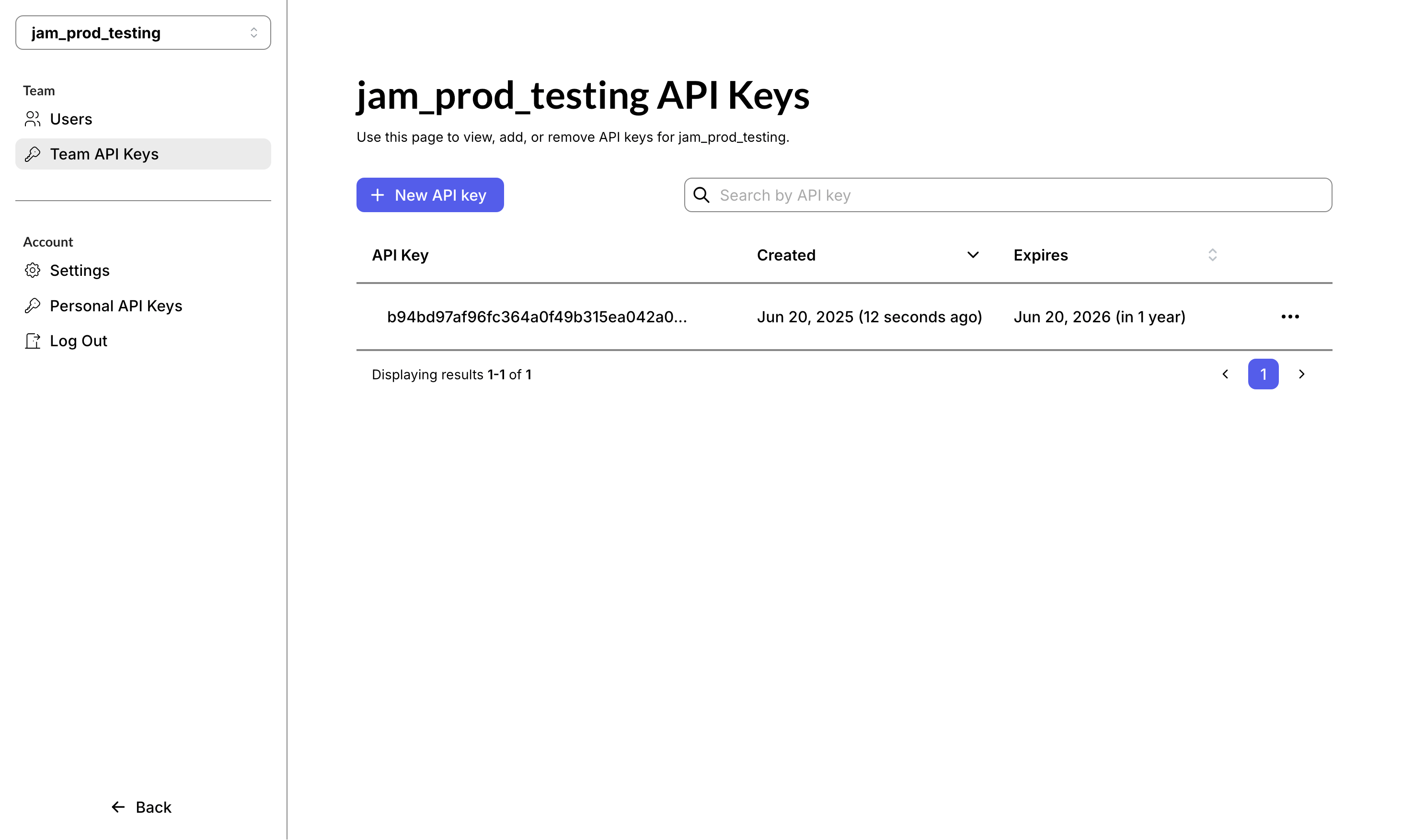 Keep your API key private - it grants read access to your organization's data.
If it's ever exposed, delete it and create a new one from the same page.
## The `data-export` endpoint
Once you have an API key, you can pull data from the `data-export` endpoint of the Jam API. The full, interactive schema for every operation lives in the [API reference](/api-reference/data-export/export-paginated-users-data).
The most relevant entities for reporting are:
* **Users:** `users`, `teams`
* **Training content:** `missions`, `tracks`
* **Training activity:** `sprints`, `track-assignments`, and `mission-assignments` created by managers to drive engagement, plus the resulting `sessions` played by learners.
A **session** is a single roleplay round (audio interaction plus AI feedback) played by one user on a specific mission. The session object includes the most important performance information:
* the overall session `score` (0-100) - the main performance metric in JAM
* a breakdown per task in the scorecard - each task has an underlying `itemScore` (0-6), mapped to "solved", "partly solved", or "not yet solved"
## Example use cases
Below are two Python examples illustrating the kind of queries you can write with the `data-export` endpoint.
### Example 1: Get all sessions played by all users
This example uses the `data-export` endpoint to get all roleplay sessions played by all users, to track each user's activity. We:
* start from the `sessions` object
* extract the `score` (0-100) and whether the session was `completed`
* add user names from the `users` object
* add mission titles from the `missions` object
* export the result as a CSV to share with stakeholders
This example is designed for [Google Colab](https://colab.research.google.com/). For it to work, store your API key in the Colab notebook's **Secrets** section and reference it in the configuration.
```python theme={null}
import pandas as pd
import requests
from google.colab import userdata
from typing import Any
# --- Configuration ---
API_KEY: str | None = userdata.get('JAM-API')
if not API_KEY:
raise RuntimeError("Set your Jam API key as a Colab secret named 'JAM-API' before running.")
BASE_URL: str = "https://api.wejam.ai/api/v1/data-exports"
HEADERS: dict[str, str] = {"accept": "application/json", "X-API-KEY": API_KEY}
def fetch_paginated(endpoint: str) -> pd.DataFrame:
"""Fetches all pages for a given endpoint and returns a DataFrame."""
page: int = 1
results: list[dict[str, Any]] = []
while True:
url: str = f"{BASE_URL}/{endpoint}?page={page}&limit=100"
response: requests.Response = requests.get(url, headers=HEADERS, timeout=10)
response.raise_for_status()
data: dict[str, Any] = response.json()
results.extend(data["data"])
if not data["meta"].get("hasNext"):
break
page += 1
return pd.DataFrame(results)
def process_data(df_sessions: pd.DataFrame, df_users: pd.DataFrame, df_missions: pd.DataFrame) -> pd.DataFrame:
"""Handles all data cleaning, merging, and restructuring logic (DRY)."""
# 1. Clean Sessions: Extract score early to keep logic localized
df_sessions["score"] = df_sessions["analysis"].apply(
lambda x: x.get("score") if isinstance(x, dict) else 0
).fillna(0).astype(int)
# 2. Enrich Sessions with User Data
df_enriched = df_sessions.merge(
df_users[["id", "firstName", "lastName"]],
left_on="learnerUserId",
right_on="id",
how="left"
)
# 3. Enrich with Mission Titles
df_enriched = df_enriched.merge(
df_missions[["id", "title"]],
left_on="missionId",
right_on="id",
how="left",
suffixes=('', '_mission')
)
# 4. Final Transformation: Create derived columns and select output
df_enriched["UserName"] = df_enriched["firstName"].fillna("") + " " + df_enriched["lastName"].fillna("")
output = df_enriched[[
"UserName",
"title",
"createdAt",
"score",
"completed"
]].rename(columns={
"title": "MissionTitle",
"createdAt": "SessionDate",
"score": "Score",
"completed": "Completed"
})
return output.sort_values("SessionDate", ascending=False)
def main() -> None:
# Step 1: Fetch raw data
print("Fetching data from API...")
df_u = fetch_paginated("users")
df_s = fetch_paginated("sessions")
df_m = fetch_paginated("missions")
# Step 2: Process and transform
df_final = process_data(df_s, df_u, df_m)
# Step 3: Export results to CSV
df_final.to_csv("sessions_with_users.csv", index=False)
print(f"\nSuccess. Processed {len(df_final)} sessions.")
display(df_final.head(20))
if __name__ == "__main__":
main()
```
**Sample output**
| UserName | MissionTitle | SessionDate | Score | Completed |
| -------------- | --------------------------------------------------------- | ------------------------ | ----- | --------- |
| Emily Carter | Full Sales Call: "How did you get my number?" | 2026-06-03T13:43:48.354Z | 0 | false |
| Emily Carter | Warm Outreach: Following Up with Existing Leads | 2026-06-03T13:34:23.313Z | 83 | true |
| Sophia Bennett | Negotiating a Price Adjustment | 2026-06-03T09:49:56.301Z | 100 | true |
| Sophia Bennett | Handling Customer Objections | 2026-06-03T09:43:03.122Z | 94 | true |
| Oliver Brooks | Discovery Call: The Customer Who Wants to Explore Options | 2026-06-03T08:26:32.375Z | 88 | true |
### Example 2: Get the most active user by number of sessions
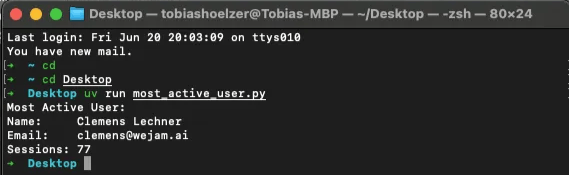
The goal here is to find the **most active user** by number of sessions played. We:
* start from the `sessions` data
* count the roleplay sessions played by each user
* add user information from the `users` data
```python theme={null}
# /// script
# dependencies = [
# "requests<3",
# "pandas",
# ]
# ///
import os
from typing import Any
import pandas as pd
import requests
# Load the key from the environment - never hard-code it into the script.
API_KEY: str | None = os.environ.get("JAM_API_KEY")
if not API_KEY:
raise SystemExit("Set the JAM_API_KEY environment variable before running.")
BASE_URL: str = "https://api.wejam.ai/api/v1/data-exports"
HEADERS: dict[str, str] = {"accept": "application/json", "X-API-KEY": API_KEY}
def fetch_paginated(endpoint: str) -> list[dict[str, Any]]:
page: int = 1
results: list[dict[str, Any]] = []
while True:
url: str = f"{BASE_URL}/{endpoint}?page={page}&limit=100"
response: requests.Response = requests.get(url, headers=HEADERS, timeout=10)
response.raise_for_status()
data: dict[str, Any] = response.json()
results.extend(data["data"])
if not data["meta"].get("hasNext"):
break
page += 1
return results
def main() -> None:
users_data: list[dict[str, Any]] = fetch_paginated("users")
sessions_data: list[dict[str, Any]] = fetch_paginated("sessions")
df_sessions: pd.DataFrame = pd.DataFrame(sessions_data)
df_users: pd.DataFrame = pd.DataFrame(users_data)
# Count sessions per user
session_counts: pd.DataFrame = (
df_sessions["learnerUserId"].value_counts().rename_axis("userId").reset_index(name="sessionCount")
)
# Join with users
df_users["userId"] = df_users["id"]
df_merged: pd.DataFrame = session_counts.merge(df_users, on="userId", how="left")
# Get most active user
most_active_user: pd.Series = df_merged.sort_values(by="sessionCount", ascending=False).iloc[0]
print("Most Active User:")
print(f"Name: {most_active_user['firstName']} {most_active_user['lastName']}")
print(f"Email: {most_active_user['email']}")
print(f"Sessions: {most_active_user['sessionCount']}")
if __name__ == "__main__":
main()
```
Run the script with [uv](https://docs.astral.sh/uv/), passing your key via the environment:
```bash theme={null}
JAM_API_KEY="your-key" uv run most_active_user.py
```
Keep your API key private - it grants read access to your organization's data.
If it's ever exposed, delete it and create a new one from the same page.
## The `data-export` endpoint
Once you have an API key, you can pull data from the `data-export` endpoint of the Jam API. The full, interactive schema for every operation lives in the [API reference](/api-reference/data-export/export-paginated-users-data).
The most relevant entities for reporting are:
* **Users:** `users`, `teams`
* **Training content:** `missions`, `tracks`
* **Training activity:** `sprints`, `track-assignments`, and `mission-assignments` created by managers to drive engagement, plus the resulting `sessions` played by learners.
A **session** is a single roleplay round (audio interaction plus AI feedback) played by one user on a specific mission. The session object includes the most important performance information:
* the overall session `score` (0-100) - the main performance metric in JAM
* a breakdown per task in the scorecard - each task has an underlying `itemScore` (0-6), mapped to "solved", "partly solved", or "not yet solved"
## Example use cases
Below are two Python examples illustrating the kind of queries you can write with the `data-export` endpoint.
### Example 1: Get all sessions played by all users
This example uses the `data-export` endpoint to get all roleplay sessions played by all users, to track each user's activity. We:
* start from the `sessions` object
* extract the `score` (0-100) and whether the session was `completed`
* add user names from the `users` object
* add mission titles from the `missions` object
* export the result as a CSV to share with stakeholders
This example is designed for [Google Colab](https://colab.research.google.com/). For it to work, store your API key in the Colab notebook's **Secrets** section and reference it in the configuration.
```python theme={null}
import pandas as pd
import requests
from google.colab import userdata
from typing import Any
# --- Configuration ---
API_KEY: str | None = userdata.get('JAM-API')
if not API_KEY:
raise RuntimeError("Set your Jam API key as a Colab secret named 'JAM-API' before running.")
BASE_URL: str = "https://api.wejam.ai/api/v1/data-exports"
HEADERS: dict[str, str] = {"accept": "application/json", "X-API-KEY": API_KEY}
def fetch_paginated(endpoint: str) -> pd.DataFrame:
"""Fetches all pages for a given endpoint and returns a DataFrame."""
page: int = 1
results: list[dict[str, Any]] = []
while True:
url: str = f"{BASE_URL}/{endpoint}?page={page}&limit=100"
response: requests.Response = requests.get(url, headers=HEADERS, timeout=10)
response.raise_for_status()
data: dict[str, Any] = response.json()
results.extend(data["data"])
if not data["meta"].get("hasNext"):
break
page += 1
return pd.DataFrame(results)
def process_data(df_sessions: pd.DataFrame, df_users: pd.DataFrame, df_missions: pd.DataFrame) -> pd.DataFrame:
"""Handles all data cleaning, merging, and restructuring logic (DRY)."""
# 1. Clean Sessions: Extract score early to keep logic localized
df_sessions["score"] = df_sessions["analysis"].apply(
lambda x: x.get("score") if isinstance(x, dict) else 0
).fillna(0).astype(int)
# 2. Enrich Sessions with User Data
df_enriched = df_sessions.merge(
df_users[["id", "firstName", "lastName"]],
left_on="learnerUserId",
right_on="id",
how="left"
)
# 3. Enrich with Mission Titles
df_enriched = df_enriched.merge(
df_missions[["id", "title"]],
left_on="missionId",
right_on="id",
how="left",
suffixes=('', '_mission')
)
# 4. Final Transformation: Create derived columns and select output
df_enriched["UserName"] = df_enriched["firstName"].fillna("") + " " + df_enriched["lastName"].fillna("")
output = df_enriched[[
"UserName",
"title",
"createdAt",
"score",
"completed"
]].rename(columns={
"title": "MissionTitle",
"createdAt": "SessionDate",
"score": "Score",
"completed": "Completed"
})
return output.sort_values("SessionDate", ascending=False)
def main() -> None:
# Step 1: Fetch raw data
print("Fetching data from API...")
df_u = fetch_paginated("users")
df_s = fetch_paginated("sessions")
df_m = fetch_paginated("missions")
# Step 2: Process and transform
df_final = process_data(df_s, df_u, df_m)
# Step 3: Export results to CSV
df_final.to_csv("sessions_with_users.csv", index=False)
print(f"\nSuccess. Processed {len(df_final)} sessions.")
display(df_final.head(20))
if __name__ == "__main__":
main()
```
**Sample output**
| UserName | MissionTitle | SessionDate | Score | Completed |
| -------------- | --------------------------------------------------------- | ------------------------ | ----- | --------- |
| Emily Carter | Full Sales Call: "How did you get my number?" | 2026-06-03T13:43:48.354Z | 0 | false |
| Emily Carter | Warm Outreach: Following Up with Existing Leads | 2026-06-03T13:34:23.313Z | 83 | true |
| Sophia Bennett | Negotiating a Price Adjustment | 2026-06-03T09:49:56.301Z | 100 | true |
| Sophia Bennett | Handling Customer Objections | 2026-06-03T09:43:03.122Z | 94 | true |
| Oliver Brooks | Discovery Call: The Customer Who Wants to Explore Options | 2026-06-03T08:26:32.375Z | 88 | true |
### Example 2: Get the most active user by number of sessions
The goal here is to find the **most active user** by number of sessions played. We:
* start from the `sessions` data
* count the roleplay sessions played by each user
* add user information from the `users` data
```python theme={null}
# /// script
# dependencies = [
# "requests<3",
# "pandas",
# ]
# ///
import os
from typing import Any
import pandas as pd
import requests
# Load the key from the environment - never hard-code it into the script.
API_KEY: str | None = os.environ.get("JAM_API_KEY")
if not API_KEY:
raise SystemExit("Set the JAM_API_KEY environment variable before running.")
BASE_URL: str = "https://api.wejam.ai/api/v1/data-exports"
HEADERS: dict[str, str] = {"accept": "application/json", "X-API-KEY": API_KEY}
def fetch_paginated(endpoint: str) -> list[dict[str, Any]]:
page: int = 1
results: list[dict[str, Any]] = []
while True:
url: str = f"{BASE_URL}/{endpoint}?page={page}&limit=100"
response: requests.Response = requests.get(url, headers=HEADERS, timeout=10)
response.raise_for_status()
data: dict[str, Any] = response.json()
results.extend(data["data"])
if not data["meta"].get("hasNext"):
break
page += 1
return results
def main() -> None:
users_data: list[dict[str, Any]] = fetch_paginated("users")
sessions_data: list[dict[str, Any]] = fetch_paginated("sessions")
df_sessions: pd.DataFrame = pd.DataFrame(sessions_data)
df_users: pd.DataFrame = pd.DataFrame(users_data)
# Count sessions per user
session_counts: pd.DataFrame = (
df_sessions["learnerUserId"].value_counts().rename_axis("userId").reset_index(name="sessionCount")
)
# Join with users
df_users["userId"] = df_users["id"]
df_merged: pd.DataFrame = session_counts.merge(df_users, on="userId", how="left")
# Get most active user
most_active_user: pd.Series = df_merged.sort_values(by="sessionCount", ascending=False).iloc[0]
print("Most Active User:")
print(f"Name: {most_active_user['firstName']} {most_active_user['lastName']}")
print(f"Email: {most_active_user['email']}")
print(f"Sessions: {most_active_user['sessionCount']}")
if __name__ == "__main__":
main()
```
Run the script with [uv](https://docs.astral.sh/uv/), passing your key via the environment:
```bash theme={null}
JAM_API_KEY="your-key" uv run most_active_user.py
```
 ## Related articles
* [Export training data to Excel via the Jam API](/external/coach/help-and-reference/export-to-excel) - a no-code path using Excel Power Query
* [API reference](/api-reference/data-export/export-paginated-users-data) - full schema for every `data-export` endpoint
***
*Last updated: June 2026*
## Related articles
* [Export training data to Excel via the Jam API](/external/coach/help-and-reference/export-to-excel) - a no-code path using Excel Power Query
* [API reference](/api-reference/data-export/export-paginated-users-data) - full schema for every `data-export` endpoint
***
*Last updated: June 2026*