> ## Documentation Index
> Fetch the complete documentation index at: https://docs.wejam.ai/llms.txt
> Use this file to discover all available pages before exploring further.
# Integrating Real Call Analysis
> Connect your transcription provider to Jam so real sales calls are automatically analyzed and scored.
Real Call Analysis works by receiving a call transcript from your transcription provider (Fireflies, Gong, Mojo, etc.) and running it through a Jam scorecard to generate structured feedback. The integration sends the transcript to the Jam API via webhook, n8n, Zapier, or a custom HTTP request.
**API reference:** [POST /api/v1/real-call-sessions](/api-reference/real-call-session/create-a-new-real-call-session) · [GET /{sessionId}](/api-reference/real-call-session/get-a-real-call-session-by-id) · [PATCH /{sessionId}](/api-reference/real-call-session/assign-a-scorecard-to-a-real-call-session)
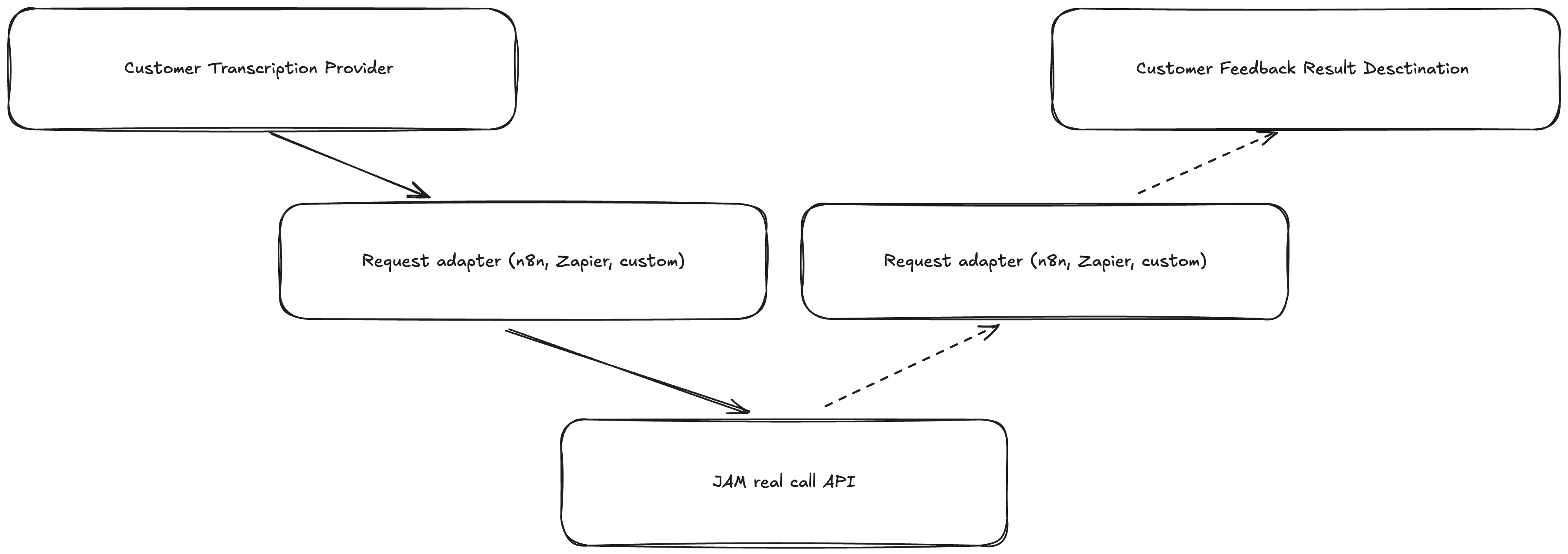 Push feedback back to your transcription provider is currently in development and will be available in a future update.
***
## Before You Start
* A Jam account with **Owner** role
* A transcription provider that supports webhooks or automation (Fireflies, Gong, Mojo, or similar)
* A scorecard configured in Jam - you'll need its ID
***
## Step 1: Create a Jam API Key
Visit [auth.wejam.ai/org/api\_keys](https://auth.wejam.ai/org/api_keys/), log in, click **New API Key**, and copy it somewhere safe. You'll use it to authenticate every request.
***
## Step 2: Find Your Scorecard ID
Go to [app.wejam.ai/real-call?activeTab=scorecards](https://app.wejam.ai/real-call?activeTab=scorecards), open the scorecard you want to use, and copy the 24-character ID from the URL (e.g. `507f1f77bcf86cd799439012`).
***
## Step 3: Send Transcripts to Jam
**API endpoint:**
```
POST https://api.wejam.ai/api/v1/real-call-sessions
x-api-key: [Your API Key]
Content-Type: application/json
```
**Required fields:**
| Field | Type | Description |
| ------------- | ------------------------- | ------------------------------------------------- |
| `transcript` | string (10-100,000 chars) | Full transcript in SRT, VTT, Gong, or Mojo format |
| `email` | email | The sales rep's email address |
| `scorecardId` | string (24 chars) | The scorecard to use for analysis |
| `meetingName` | string | The meeting title |
**Choose your integration method:**
1. Set up a transcriber webhook trigger in n8n
2. Add an **HTTP Request** node:
* URL: `https://api.wejam.ai/api/v1/real-call-sessions`
* Method: POST
* Headers: `x-api-key: [Your API Key]`, `Content-Type: application/json`
* Body (JSON):
```json theme={null}
{
"transcript": "{{$node.Webhook.FIELD_WITH_TRANSCRIPT}}",
"email": "{{$node.Webhook.FIELD_WITH_EMAIL}}",
"scorecardId": "[YOUR_SCORECARD_ID]",
"meetingName": "{{$node.Webhook.FIELD_WITH_MEETING_NAME}}"
}
```
1. Accept the Jam Zapier invitation: [zapier.com/developer/public-invite/233240/…](https://zapier.com/developer/public-invite/233240/4b2daeaf0a1b2513476256236f6aaef4/)
2. Create a Zap with your transcriber as the trigger
3. Use **Jam - Analyze Transcript** as the action
4. Map: Transcript → transcript field, Sales rep email → email, Scorecard → scorecardId, Meeting title → meetingName
```bash theme={null}
curl -X POST "https://api.wejam.ai/api/v1/real-call-sessions" \
-H "x-api-key: YOUR_API_KEY" \
-H "Content-Type: application/json" \
-d '{
"transcript": "Meeting transcript...",
"email": "rep@yourcompany.com",
"scorecardId": "507f1f77bcf86cd799439012",
"meetingName": "Weekly Sales Call"
}'
```
Any language or platform that can receive webhooks and make HTTP POST requests works.
***
## Step 4: Verify the Integration
After setting up, conduct a test meeting with your transcriber and check that the session appears in your Jam dashboard at [app.wejam.ai/real-call](https://app.wejam.ai/real-call) with all required fields populated correctly.
Push feedback back to your transcription provider is currently in development and will be available in a future update.
***
## Before You Start
* A Jam account with **Owner** role
* A transcription provider that supports webhooks or automation (Fireflies, Gong, Mojo, or similar)
* A scorecard configured in Jam - you'll need its ID
***
## Step 1: Create a Jam API Key
Visit [auth.wejam.ai/org/api\_keys](https://auth.wejam.ai/org/api_keys/), log in, click **New API Key**, and copy it somewhere safe. You'll use it to authenticate every request.
***
## Step 2: Find Your Scorecard ID
Go to [app.wejam.ai/real-call?activeTab=scorecards](https://app.wejam.ai/real-call?activeTab=scorecards), open the scorecard you want to use, and copy the 24-character ID from the URL (e.g. `507f1f77bcf86cd799439012`).
***
## Step 3: Send Transcripts to Jam
**API endpoint:**
```
POST https://api.wejam.ai/api/v1/real-call-sessions
x-api-key: [Your API Key]
Content-Type: application/json
```
**Required fields:**
| Field | Type | Description |
| ------------- | ------------------------- | ------------------------------------------------- |
| `transcript` | string (10-100,000 chars) | Full transcript in SRT, VTT, Gong, or Mojo format |
| `email` | email | The sales rep's email address |
| `scorecardId` | string (24 chars) | The scorecard to use for analysis |
| `meetingName` | string | The meeting title |
**Choose your integration method:**
1. Set up a transcriber webhook trigger in n8n
2. Add an **HTTP Request** node:
* URL: `https://api.wejam.ai/api/v1/real-call-sessions`
* Method: POST
* Headers: `x-api-key: [Your API Key]`, `Content-Type: application/json`
* Body (JSON):
```json theme={null}
{
"transcript": "{{$node.Webhook.FIELD_WITH_TRANSCRIPT}}",
"email": "{{$node.Webhook.FIELD_WITH_EMAIL}}",
"scorecardId": "[YOUR_SCORECARD_ID]",
"meetingName": "{{$node.Webhook.FIELD_WITH_MEETING_NAME}}"
}
```
1. Accept the Jam Zapier invitation: [zapier.com/developer/public-invite/233240/…](https://zapier.com/developer/public-invite/233240/4b2daeaf0a1b2513476256236f6aaef4/)
2. Create a Zap with your transcriber as the trigger
3. Use **Jam - Analyze Transcript** as the action
4. Map: Transcript → transcript field, Sales rep email → email, Scorecard → scorecardId, Meeting title → meetingName
```bash theme={null}
curl -X POST "https://api.wejam.ai/api/v1/real-call-sessions" \
-H "x-api-key: YOUR_API_KEY" \
-H "Content-Type: application/json" \
-d '{
"transcript": "Meeting transcript...",
"email": "rep@yourcompany.com",
"scorecardId": "507f1f77bcf86cd799439012",
"meetingName": "Weekly Sales Call"
}'
```
Any language or platform that can receive webhooks and make HTTP POST requests works.
***
## Step 4: Verify the Integration
After setting up, conduct a test meeting with your transcriber and check that the session appears in your Jam dashboard at [app.wejam.ai/real-call](https://app.wejam.ai/real-call) with all required fields populated correctly.